
Build a Secret Scanner in Go: Find Leaked API Keys in Git History
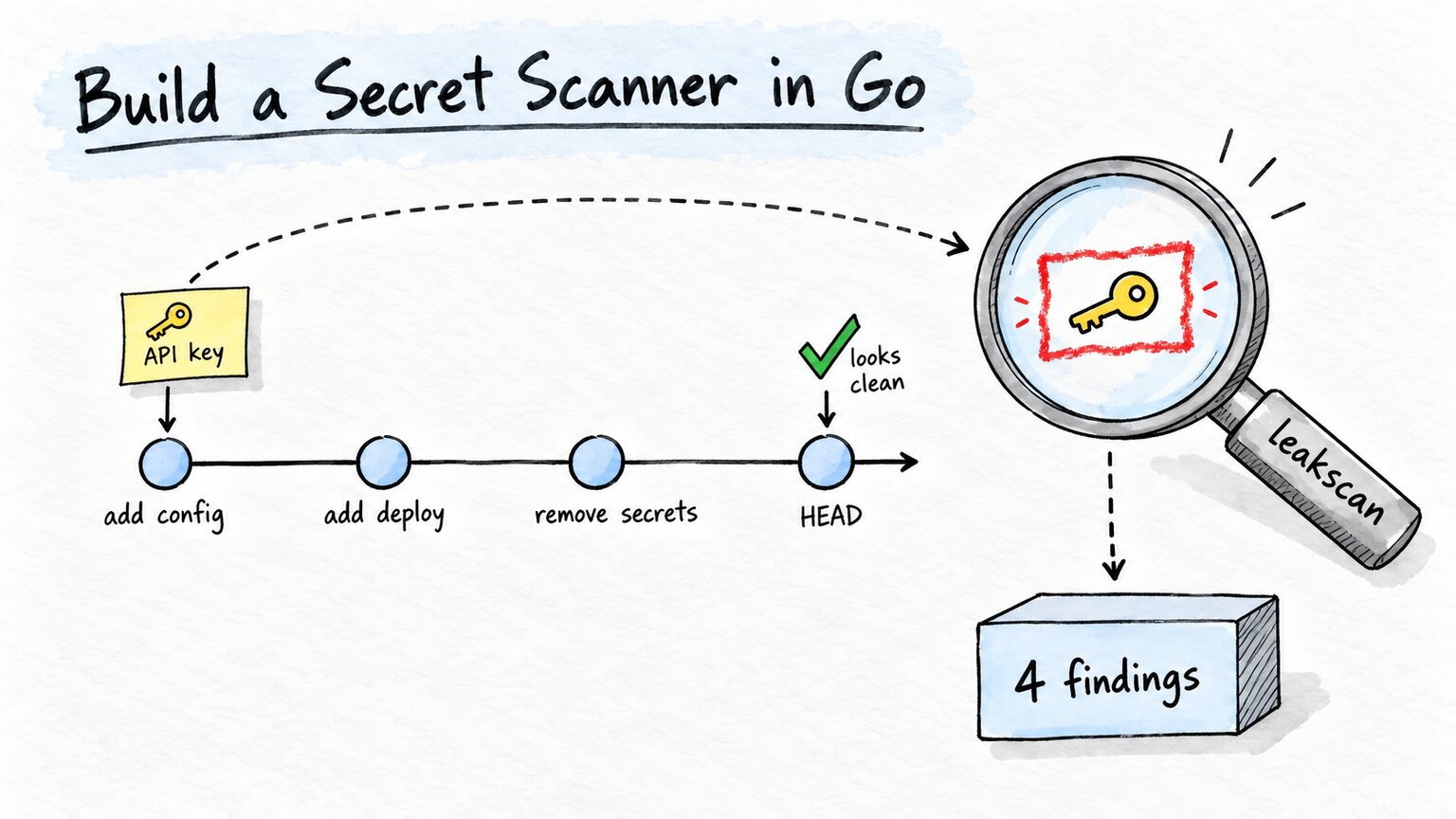
Someone commits an .env file with an AWS key in it. A reviewer spots it, the author deletes the file in the next commit, everyone moves on. The pull request looks clean, the file is gone from main, and the key is still sitting in the repository for anyone who runs git log -p.
That second part is the one people forget. Deleting a file only changes what the latest commit looks like. Every earlier commit still points at the old content, and every clone and fork has a copy of it. If you want to know whether a repository has ever leaked a secret, you have to scan its whole history. The files on disk only describe one commit.
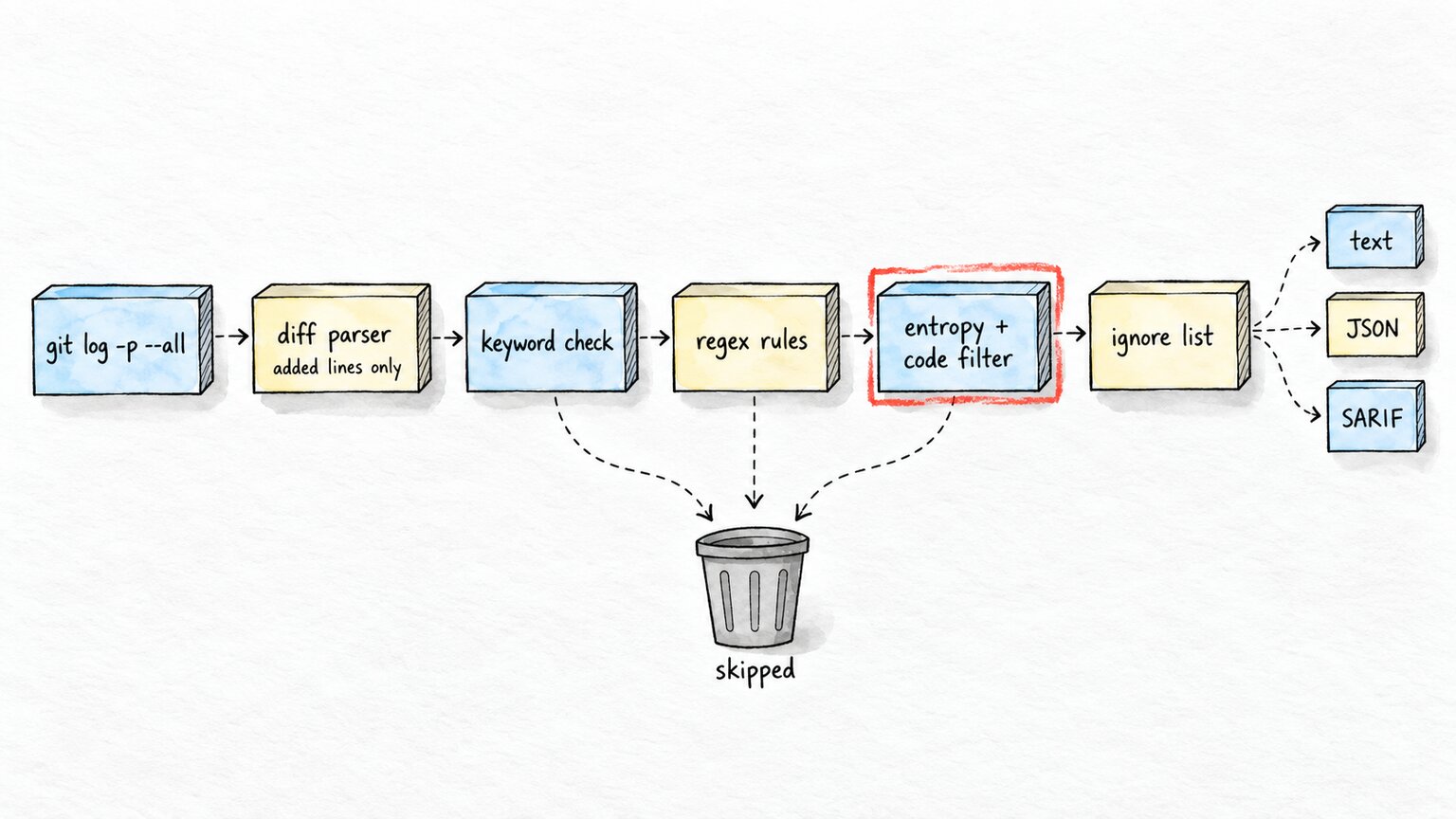
In this post we build leakscan, a small secret scanner in Go that does both: it scans a directory, and it scans every line ever added in every commit on every branch. It uses regex rules for known key formats, an entropy check for generic secrets, redacts everything it prints, supports an ignore file, and writes SARIF so GitHub can show the findings in code scanning. It has no third-party dependencies. You need Go 1.26 or newer and git on your PATH. The full code is at github.com/rezmoss/leakscan.
Deleting the file doesn’t delete the key
Git stores file contents as blobs, and each commit points at a tree of blobs. When you delete app.env in a new commit, git writes a new tree without that file. The old tree and the old blob are untouched, because the old commit still needs them.
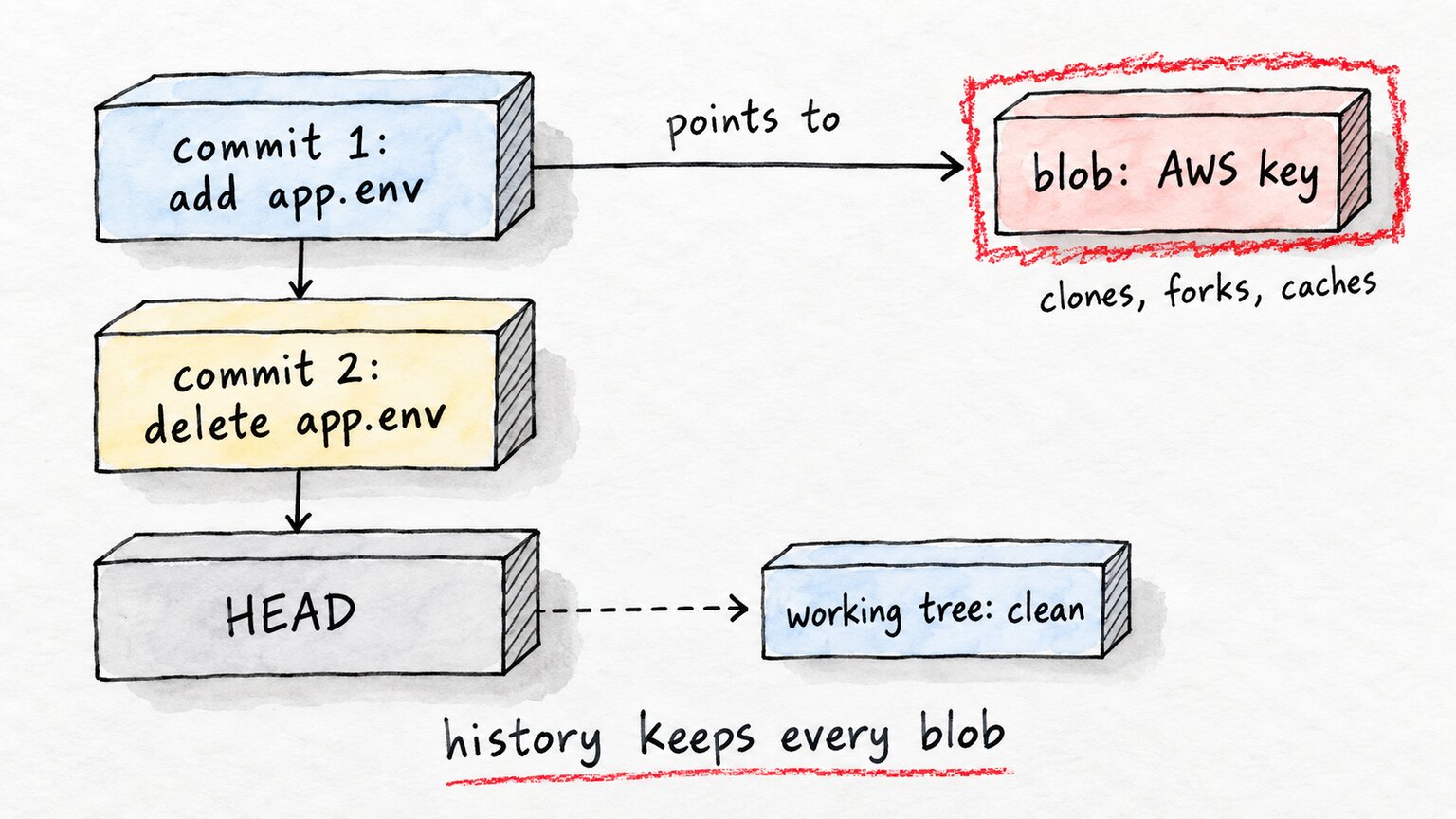
You can see this with nothing but git. The demo repo in the companion code adds a config file in one commit and removes it in a later one. Asking git for the patch history of that file shows both sides. I’ve masked the key values here, but the real output has them in full:
^@commit 056f00c0d90c5ebf134146c993ad3a2705951195

diff --git a/config/app.env b/config/app.env
deleted file mode 100644
index 91a5b96..0000000
--- a/config/app.env
+++ /dev/null
@@ -1,4 +0,0 @@
-APP_NAME=shop
-AWS_ACCESS_KEY_ID=AKIA<redacted>
-AWS_SECRET_ACCESS_KEY=hT9q<redacted>
-DB_PASSWORD=changeme123
^@commit 55349216432f3b6c7cf8ea67ac4840567a897819

diff --git a/config/app.env b/config/app.env
new file mode 100644
index 0000000..91a5b96
--- /dev/null
+++ b/config/app.env
@@ -0,0 +1,4 @@
+APP_NAME=shop
+AWS_ACCESS_KEY_ID=AKIA<redacted>
+AWS_SECRET_ACCESS_KEY=hT9q<redacted>
+DB_PASSWORD=changeme123
This output is the whole idea of the history scanner. Every secret that was ever committed shows up once as a + line in some commit. If we read the + lines of git log -p and run detection on them, we’ve scanned the full history. We can skip the - lines, because anything removed was added somewhere earlier.
That ^@ at the start of the commit lines is a NUL byte, and the parser depends on it.
It also explains the order of operations when you do find a real key. Rewriting history with git filter-repo cleans your copy, but the key has already been pushed, cloned and maybe cached. Revoke and rotate the key first. Cleaning history comes second, if at all.
Rules that catch real keys
Most real secrets have a recognizable shape. AWS access key IDs start with AKIA or ASIA followed by 16 uppercase letters and digits. GitHub tokens start with ghp_, gho_ and friends. Stripe live keys start with sk_live_. A regex per format catches these with few false positives, because random text almost never looks like AKIA plus 16 characters.
A rule in leakscan is a plain struct:
// Rule is one secret type. Regex needs exactly one capture group (the secret).
// Keywords are lowercase, cheap pre-check before the regex.
type Rule struct {
	ID           string
	Description  string
	Keywords     []string
	Regex        *regexp.Regexp
	CheckEntropy bool
}
The rule list is a slice of these. Here are three of the six rules that ship with it:
	{
		ID:          "aws-access-key-id",
		Description: "AWS access key ID",
		Keywords:    []string{"akia", "asia"},
		Regex:       regexp.MustCompile(`\b((?:AKIA|ASIA)[0-9A-Z]{16})\b`),
	},
	{
		ID:          "github-token",
		Description: "GitHub personal access or app token",
		Keywords:    []string{"ghp_", "gho_", "ghu_", "ghs_", "ghr_", "github_pat_"},
		Regex:       regexp.MustCompile(`\b(gh[pousr]_[A-Za-z0-9]{36,255}|github_pat_[A-Za-z0-9_]{82})\b`),
	},
	{
		ID:           "generic-secret",
		Description:  "Generic secret assigned to a key, token or password variable",
		Keywords:     []string{"key", "secret", "token", "passw"},
		Regex:        regexp.MustCompile(`(?i)(?:api[_-]?key|secret|token|passw(?:or)?d)\w*["']?\s*[:=]\s*["']?([A-Za-z0-9_\-+/=.]{8,})`),
		CheckEntropy: true,
	},
The others cover Slack tokens, Stripe live keys and -----BEGIN ... PRIVATE KEY----- lines. Each regex has exactly one capture group, and that group is the secret. The text around it, like AWS_ACCESS_KEY_ID=, helps find it but isn’t part of what we report.
The Keywords field is there for speed. A history scan runs every rule on every added line, and most lines in a codebase have nothing to do with secrets. Before running a regex, the detector lowercases the line once and checks whether any of the rule’s keywords appear in it. strings.Contains is much cheaper than a regex, so most lines skip most rules after a few substring checks.
// Find returns all matches in line. A span is reported once, so specific
// rules go before generic ones.
func (d *Detector) Find(line string) []Match {
	lower := strings.ToLower(line)
	var matches []Match
	for i := range d.Rules {
		r := &d.Rules[i]
		if !slices.ContainsFunc(r.Keywords, func(k string) bool { return strings.Contains(lower, k) }) {
			continue
		}
		for _, loc := range r.Regex.FindAllStringSubmatchIndex(line, -1) {
			start, end := loc[2], loc[3]
			if overlaps(matches, start, end) {
				continue
			}
			secret := line[start:end]
			if r.CheckEntropy && (Entropy(secret) < d.MinEntropy || looksLikeCode(line, start, end)) {
				continue
			}
			matches = append(matches, Match{Rule: r, Secret: secret, Column: start + 1, start: start, end: end})
		}
	}
	return matches
}
The overlaps check came from the first real run. The demo repo has export GITHUB_TOKEN=ghp_... in a shell script, and leakscan reported it twice: once from github-token, and once from generic-secret because the variable name contains TOKEN. Both were right, but one key showing up as two findings is noise. Now a span that one rule already matched is skipped by later rules, and since the specific rules come before the generic one in the list, the more useful label wins.
Writing tests for a secret scanner raised a problem of its own. The tests need strings that look like real keys, and a file full of realistic AWS and Stripe keys is exactly what GitHub push protection and other scanners block. So every fake key in the tests is built from pieces, like "AKIA" + "Q3XZ7RBN4LKT2WMP", which the regex can’t see in the source but which is a complete key at runtime.
Entropy, or telling a key from changeme123
The specific rules are easy. The generic rule is harder, because password= is followed by real secrets and by junk in roughly equal measure. DB_PASSWORD=changeme123 in a sample config is not a leak. apiKey := os.Getenv("API_KEY") is the correct way to load a key, and a naive regex flags it anyway.
Shannon entropy separates most of these. It measures how unpredictable the characters in a string are, in bits per character. A string of one repeated letter scores 0. Random base64 scores close to 6. Words and identifiers sit in between, because they repeat letters and use a small part of the alphabet.
// Entropy is Shannon entropy of s, bits per byte.
func Entropy(s string) float64 {
	if s == "" {
		return 0
	}
	var counts [256]int
	for i := range len(s) {
		counts[s[i]]++
	}
	n := float64(len(s))
	var h float64
	for _, c := range counts {
		if c == 0 {
			continue
		}
		p := float64(c) / n
		h -= p * math.Log2(p)
	}
	return h
}
A fixed [256]int array is enough because we count bytes, not runes. Keys are ASCII, and it avoids a map allocation per string. To pick a threshold, I logged the entropy of a few strings in a test. The last three are the fake keys from the test file, masked here so this page doesn’t trip any scanners itself:
"changeme123"                                 3.28
"os.Getenv"                                   2.95
"password1234"                                3.42
"hT9q************************************"    5.22
"AKIA****************"                        4.12
"ghp_************************************"    5.27
The fake keys all score above 4. The placeholders score below 3.5, so that became the default, and it only applies to rules with CheckEntropy set. The known formats skip it, since an AKIA key is a finding no matter what its entropy is. Look at password1234, though: 3.42 is close to the line. A weak real password can fall below the threshold and get missed. That tradeoff is why the threshold is a flag (-entropy).
On the demo repo, setting -entropy 0 turns the filter off and adds one finding, DB_PASSWORD=changeme123. With the default threshold it’s gone, and the real AWS secret key on the line above it, at 5.22, stays.
Real code is full of things named token
The demo repo was too easy, so I ran the scanner on the full history of gin, 2,076 commits. The first version reported 35 findings. Four of them were private keys in test fixtures, like testdata/certificate/key.pem, which is correct: a scanner can’t know that a key is only for tests. The other 31 were all the generic rule, and none of them were secrets.
At some point gin had a vendor/ directory, and vendored Go code says token a lot:
tokens = docGroup.Tokens
TokenStore:                       config.TokenStore,
procAdjustTokenGroups                                    = modadvapi32.NewProc("AdjustTokenGroups")
TOKEN_ALL_ACCESS = STANDARD_RIGHTS_REQUIRED |
Every one of these passes the regex: a name containing token, then = or :, then 8 or more allowed characters. And modadvapi32.NewProc or STANDARD_RIGHTS_REQUIRED have enough character variety to pass the entropy check too. Entropy can tell a key from changeme123, but it can’t tell a key from a long identifier.
The fix is to look at the shape of the value. Real secrets are almost never a dotted Go selector, an ALL_CAPS constant, a run of letters with no digits, or something followed directly by (. Code references almost always are:
var (
	plainIdent  = regexp.MustCompile(`^[A-Za-z_]+$`)
	dottedIdent = regexp.MustCompile(`^[A-Za-z_]\w*(?:\.[A-Za-z_]\w*)+$`)
	constIdent  = regexp.MustCompile(`^[A-Z][A-Z0-9]*(?:_[A-Z0-9]+)+$`)
)

// looksLikeCode: call, config.TokenStore, TOKEN_ALL_ACCESS etc.
// JWTs are dotted too but start with "eyJ".
func looksLikeCode(line string, start, end int) bool {
	s := line[start:end]
	switch {
	case strings.HasPrefix(s, "eyJ"):
		return false
	case strings.HasPrefix(line[end:], "("):
		return true
	}
	return plainIdent.MatchString(s) || dottedIdent.MatchString(s) || constIdent.MatchString(s)
}
A JSON Web Token is three base64url segments joined with dots, which can look like a dotted identifier. Every JWT starts with eyJ, because that’s {" in base64, so tokens with that prefix are always kept. There’s a test that makes sure an AUTH_TOKEN=eyJ... line is still reported.
I added the dotted and constant patterns first, and gin went from 35 findings to 7. The remaining three generic hits were tokenToOriginMap: tokenToOriginMap, and two hkdfExpandLabel(...) calls, which the plain-identifier and ( checks handle. After that, gin reports exactly the 4 fixture keys. I also ran it on cobra, 1,118 commits, which came back with 0 findings.
This is the least scientific part of a secret scanner, and every tool in this space has a list of heuristics like this one. Each one trades some recall for less noise. Test them on real repositories. You wrote your own examples, so of course they pass.
Reading git history without loading it
Go has a pure Go git implementation, go-git, and my first thought was to use it. But all we need is the text that git log -p already prints, and the git binary is fast at producing it and already installed wherever a repository is. So leakscan runs git as a subprocess and reads its output as a stream:
// NUL never shows up in text diffs, so no clash w/ file content.
const commitMarker = "\x00commit "

// ScanGit scans every line added in any commit on any ref.
func (d *Detector) ScanGit(ctx context.Context, repo string) ([]Finding, error) {
	cmd := exec.CommandContext(ctx, "git", "-C", repo,
		"-c", "core.quotePath=false",
		"log", "-p", "-U0", "--all", "--no-color", "--no-ext-diff", "--no-renames",
		"--format=%x00commit %H")
	var stderr bytes.Buffer
	cmd.Stderr = &stderr
	cmd.WaitDelay = 5 * time.Second
	out, err := cmd.StdoutPipe()
	if err != nil {
		return nil, err
	}
	if err := cmd.Start(); err != nil {
		return nil, fmt.Errorf("git start: %w", err)
	}

	findings, parseErr := d.parseLog(out)
	if parseErr != nil {
		// drain, else git blocks on full pipe
		io.Copy(io.Discard, out)
	}
	if err := cmd.Wait(); err != nil {
		return nil, fmt.Errorf("git log: %w: %s", err, strings.TrimSpace(stderr.String()))
	}
	return findings, parseErr
}
Each flag has a job. --all includes every branch and tag, because a key on an abandoned feature branch has leaked just as much as one on main. -U0 drops context lines, since we only want added lines, and it shrinks the output a lot. --no-color and --no-ext-diff protect against user config that would change the format. --no-renames makes a renamed file show up as a full add, so the parser sees one simple case. core.quotePath=false stops git from escaping non-ASCII file names.
The custom --format is the NUL byte from earlier. Diff content lines always start with +, - or a space, so a file line can’t pass for a commit header. But the parser trusts the header format without any checks, so I wanted it to be a marker nothing else could produce. Git treats files with NUL bytes as binary and prints Binary files differ instead of their lines, so in practice a line that starts with NUL only comes from our format string.
Stderr goes into a buffer so the error message is useful. Running it on a folder that isn’t a repository gives git log: exit status 128: fatal: not a git repository ... instead of just exit status 128. WaitDelay makes sure Wait returns even if git hangs after a cancelled context.
The parser is a small state machine over lines:
// parseLog checks added lines of `git log -p -U0` output.
func (d *Detector) parseLog(r io.Reader) ([]Finding, error) {
	var (
		findings []Finding
		commit   string
		file     string
		line     int
		inHunk   bool
	)
	s := bufio.NewScanner(r)
	s.Buffer(make([]byte, 0, 64<<10), maxLineSize)
	for s.Scan() {
		text := s.Text()
		if hash, ok := strings.CutPrefix(text, commitMarker); ok {
			commit = hash
			file, inHunk = "", false
			continue
		}
		switch {
		case strings.HasPrefix(text, "diff --git "):
			file, inHunk = "", false
		case !inHunk && strings.HasPrefix(text, "+++ "):
			file = parseNewPath(text)
		case strings.HasPrefix(text, "@@ "):
			inHunk = true
			line = parseHunkStart(text)
		case inHunk && file != "" && strings.HasPrefix(text, "+"):
			for _, m := range d.Find(text[1:]) {
				findings = append(findings, newFinding(m, file, line, commit))
			}
			line++
		}
	}
	if err := s.Err(); err != nil {
		return nil, fmt.Errorf("read git log: %w", err)
	}
	return findings, nil
}
The inHunk flag fixes a subtle bug. The file header +++ b/config/app.env and an added line whose content starts with ++ look the same: both begin with +++ . Inside a hunk, everything that starts with + is content. Outside a hunk, +++ is a header. +++ /dev/null means the file was deleted, so parseNewPath returns an empty file name and its lines are skipped. The test for parseLog feeds in a hand-written diff with these cases.
Line numbers come from the hunk header. @@ -10,0 +11,1 @@ means the new lines start at line 11 of the file in that commit, and each + line adds one. With -U0 there are no context lines to count, and - lines don’t move the new-file position. The strconv.Atoi in parseHunkStart is the same function from my Atoi and Itoa post, doing its job on a few digits from the middle of a string.
bufio.Scanner has a trap here, and it’s the default buffer size. A scanner can’t return a line longer than its maximum token size, which is 64 KiB unless you change it. Minified JavaScript and lockfiles have lines much longer than that. I wrote a small check with one 100,000-character line between two short ones:
lines read: 1, err: bufio.Scanner: token too long
The scanner reads the first line, hits the long one, and stops. Every line after it is never scanned, and if you forget to check s.Err() you don’t even see an error. A secret scanner that stops without a word at the first minified bundle is worse than none, because it looks like it worked. That’s why both scanners call s.Buffer with a 16 MiB limit. The directory scan test includes a 200,000-character minified file with a GitHub token at the end to keep it that way.
The directory scanner uses the same Find on every line of every file under a path. It skips .git, files over 10 MiB, and binary files, which it detects the same way git does: a NUL byte in the first 8,000 bytes.
For speed, I ran it against caddy: 5,451 commits and about 90 MB of git log -p -U0 output. A full history scan took 1.54 seconds on my machine, and it found 6 private keys, all in test files.
Fingerprints, redaction and the ignore file
A scanner that prints secrets in full creates a new leak in your CI logs. leakscan never prints the secret. It keeps the first four characters, which is enough to tell an AKIA key from a ghp_ token, and masks the rest with a fixed number of stars so the length isn’t revealed either. Secrets shorter than 12 characters are fully masked.
Test fixtures need a way to be ignored without hiding the next real leak. Ignoring by file path is too broad. Ignoring by line number breaks the moment someone adds a line above. So each finding gets a fingerprint, a hash of the commit, file, rule and secret:
func newFinding(m Match, file string, line int, commit string) Finding {
	sum := sha256.Sum256([]byte(commit + "\x00" + file + "\x00" + m.Rule.ID + "\x00" + m.Secret))
	return Finding{
		RuleID:      m.Rule.ID,
		Description: m.Rule.Description,
		File:        file,
		Line:        line,
		Column:      m.Column,
		Commit:      commit,
		Redacted:    Redact(m.Secret),
		Fingerprint: hex.EncodeToString(sum[:8]),
	}
}
The line number is left out on purpose, so a fingerprint stays the same when code moves around. The secret is part of the hash, so a different key in the same file gets a new fingerprint and shows up again. The NUL separators stop two different inputs from joining into the same string. And because it’s a hash, the fingerprint is safe to commit to the repository.
.leakscanignore is a list of these, one per line, with # comments. The JSON output plus jq writes one for you. On gin, the 4 test keys go away and the exit code changes from 1 to 0:
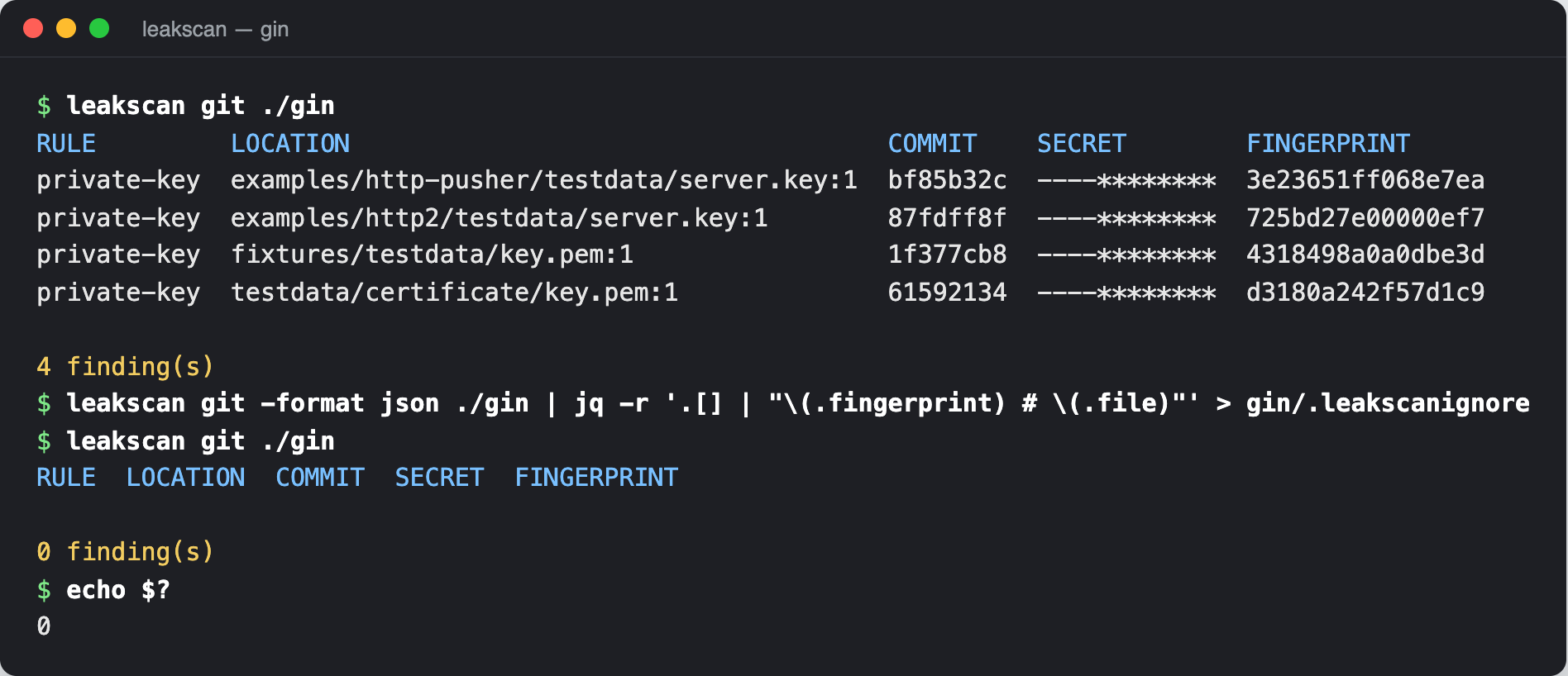
Check what you’re adding before you ignore it. A fingerprint in this file says “a human looked at this and decided it’s fine”, and a scanner can’t know whether that’s true.
SARIF and failing the build
In CI, two things matter: the job should fail when there’s a finding, and the findings should be easy to read. The exit code handles failing. leakscan exits 0 with no findings, 1 with findings, and 2 on errors, so a broken run can’t pass as a clean one. This is the demo repo: the working tree is clean, and the history isn’t.
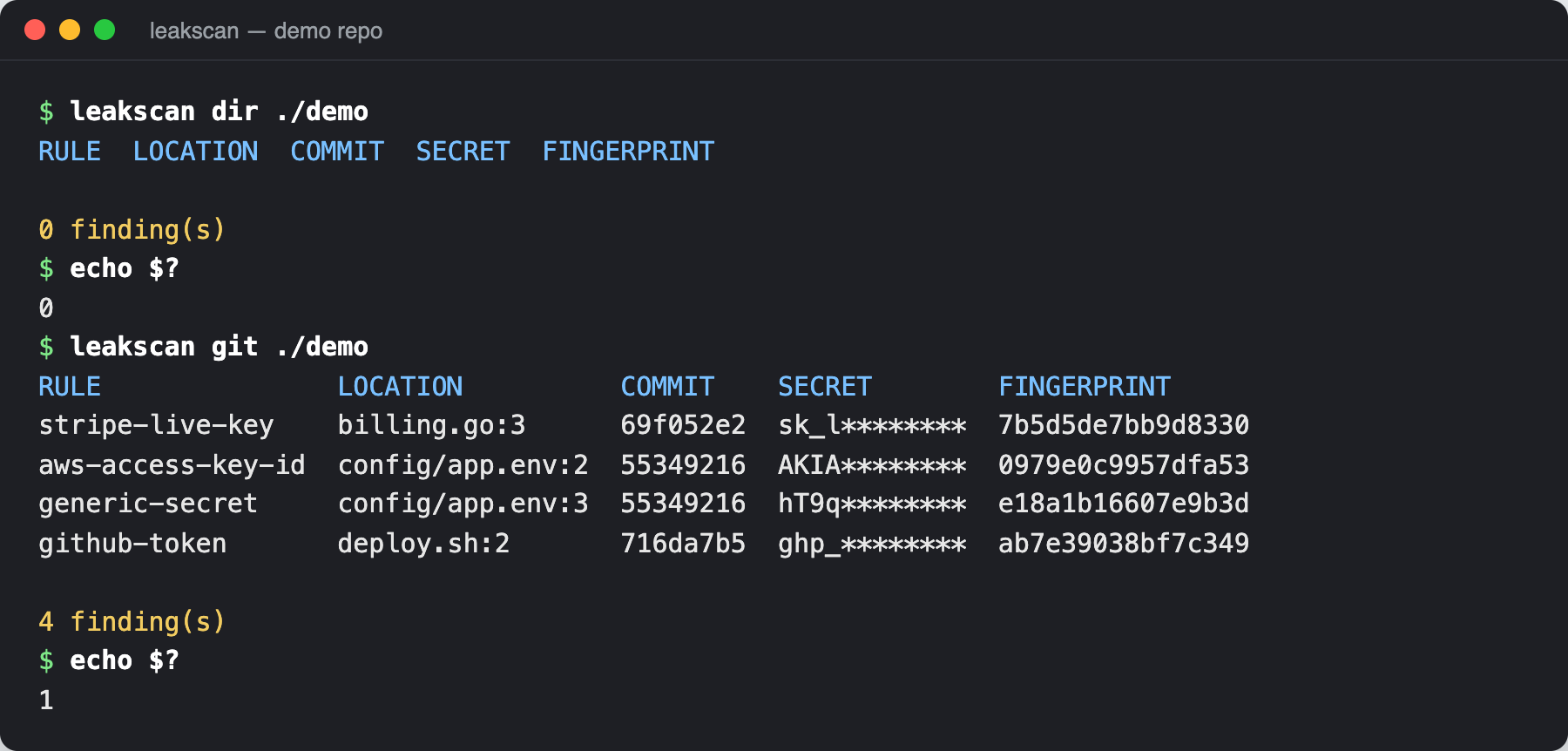
For readability, GitHub code scanning accepts SARIF 2.1.0, a JSON format for static analysis results. The spec is huge, but a useful file needs little: the tool name, the rules, and for each result a rule ID, a message and a location. I wrote a handful of small structs that match those fields and encode them with encoding/json, which is easier to read than a SARIF library:
// WriteSARIF writes SARIF 2.1.0 for GitHub code scanning.
func WriteSARIF(w io.Writer, findings []Finding, rules []Rule) error {
	run := sarifRun{
		Tool: sarifTool{Driver: sarifDriver{
			Name:           "leakscan",
			InformationURI: "https://github.com/rezmoss/leakscan",
		}},
		Results: []sarifResult{},
	}
	for _, r := range rules {
		run.Tool.Driver.Rules = append(run.Tool.Driver.Rules, sarifRule{
			ID: r.ID, ShortDescription: sarifMessage{Text: r.Description},
		})
	}
	for _, f := range findings {
		msg := fmt.Sprintf("%s found: %s", f.Description, f.Redacted)
		if f.Commit != "" {
			msg += " (commit " + shortCommit(f.Commit) + ")"
		}
		run.Results = append(run.Results, sarifResult{
			RuleID:  f.RuleID,
			Level:   "error",
			Message: sarifMessage{Text: msg},
			Locations: []sarifLocation{{PhysicalLocation: sarifPhysical{
				ArtifactLocation: sarifArtifact{URI: f.File},
				Region:           sarifRegion{StartLine: max(f.Line, 1), StartColumn: f.Column},
			}}},
			PartialFingerprints: map[string]string{"leakscan/v1": f.Fingerprint},
		})
	}
	enc := json.NewEncoder(w)
	enc.SetIndent("", "  ")
	return enc.Encode(sarifLog{
		Version: "2.1.0",
		Schema:  "https://json.schemastore.org/sarif-2.1.0.json",
		Runs:    []sarifRun{run},
	})
}
Results starts as an empty slice instead of nil so a clean scan writes "results": [] and not null. The fingerprint goes into partialFingerprints, which code scanning uses to match the same alert across runs. The commit is added to the message because, for a history finding, the file and line refer to that commit, and the file might not exist on the current branch anymore. One result from the demo repo looks like this:
{
  "ruleId": "stripe-live-key",
  "level": "error",
  "message": {
    "text": "Stripe live secret or restricted key found: sk_l******** (commit 69f052e2)"
  },
  "locations": [
    {
      "physicalLocation": {
        "artifactLocation": {
          "uri": "billing.go"
        },
        "region": {
          "startLine": 3,
          "startColumn": 18
        }
      }
    }
  ],
  "partialFingerprints": {
    "leakscan/v1": "7b5d5de7bb9d8330"
  }
}
The workflow in the repo’s examples/ folder ties it together:
# Copy to .github/workflows/leakscan.yml in the repository you want to scan.
name: leakscan

on:
  push:
  pull_request:

permissions:
  contents: read
  security-events: write

jobs:
  scan:
    runs-on: ubuntu-latest
    steps:
      - uses: actions/checkout@v7
        with:
          fetch-depth: 0 # full history, otherwise only the last commit is scanned

      - uses: actions/setup-go@v7
        with:
          go-version: "1.26"

      - name: Scan history
        id: scan
        run: |
          go install github.com/rezmoss/leakscan@latest
          leakscan git -format sarif . > leakscan.sarif || echo "status=$?" >> "$GITHUB_OUTPUT"

      - uses: github/codeql-action/upload-sarif@v4
        if: always()
        with:
          sarif_file: leakscan.sarif
          category: leakscan

      - name: Fail on findings
        if: steps.scan.outputs.status != ''
        run: exit 1
fetch-depth: 0 is the line that matters most. By default actions/checkout clones only the latest commit, so leakscan git would scan a history of exactly one commit and report it clean. The other detail is the order of the steps. If the scan step failed the job itself, the upload would never run and you’d lose the report, so the scan records its exit code, the upload always runs, and a final step fails the job. The workflow passes actionlint. The repo also has its own CI workflow that runs the tests and then runs leakscan on itself. Before adding that step, I ran the same self-scan locally, and it reported 2 findings: the generic fake key in the test file and in the demo script. I had split the AWS, GitHub and Stripe fixtures into pieces but left that one whole. After splitting it too, leakscan dir . on its own repository reports 0 findings.
Wrapping up
The core of a secret scanner is small. A few regexes, an entropy function and a diff parser fit in a few hundred lines of Go with only the standard library. The hard part is the noise. Every heuristic in looksLikeCode came from running it on a real repository and reading what it flagged, and that loop of scanning, reading and adjusting is most of the work. I’d recommend it for any detection tool you build.
There are things leakscan doesn’t catch. A secret that’s base64 encoded, split across two lines, or built at runtime from pieces (the same trick the tests use) won’t match a line-based regex. It doesn’t check whether a key is still live, which tools like trufflehog do by calling the provider’s API. Six rules is a start. Adding a rule is one struct in a slice, so it’s easy to grow it for the providers you use.
If you’re already generating SBOMs, this fits next to the drift checks from my post on comparing container SBOMs: one tells you what went into an image, the other tells you what shouldn’t have gone into the repository. And if you liked the “stream a tool’s output and parse it” approach, the goroutine visualizer does the same thing with pprof dumps.
The code, tests, demo repo script and workflow are on GitHub.
This is a starting point. leakscan shows the concept of how a secret scanner works, and its purpose is mostly educational. A real production scanner needs a lot more work: many more rules, years of tuning against false positives, and checks that tell you whether a found key is still live.